
SSM框架之Mybatis
0. ssm框架大纲
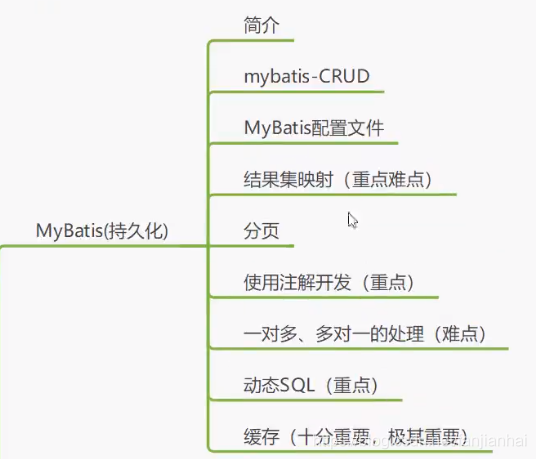
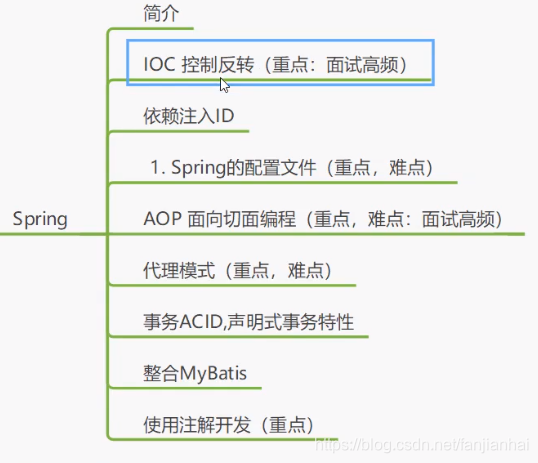
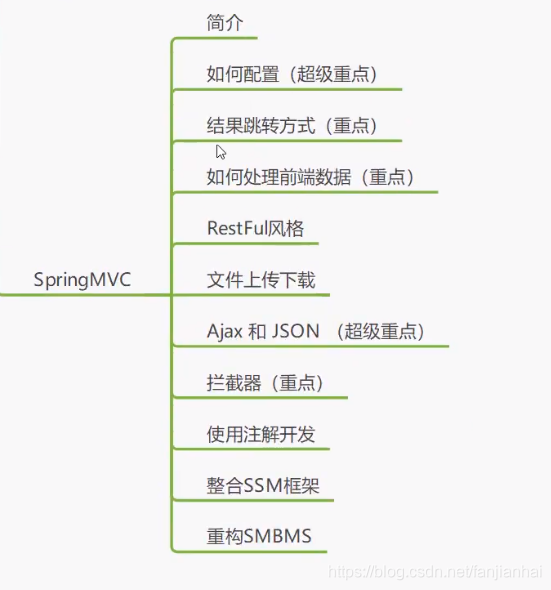
1. Mybatis
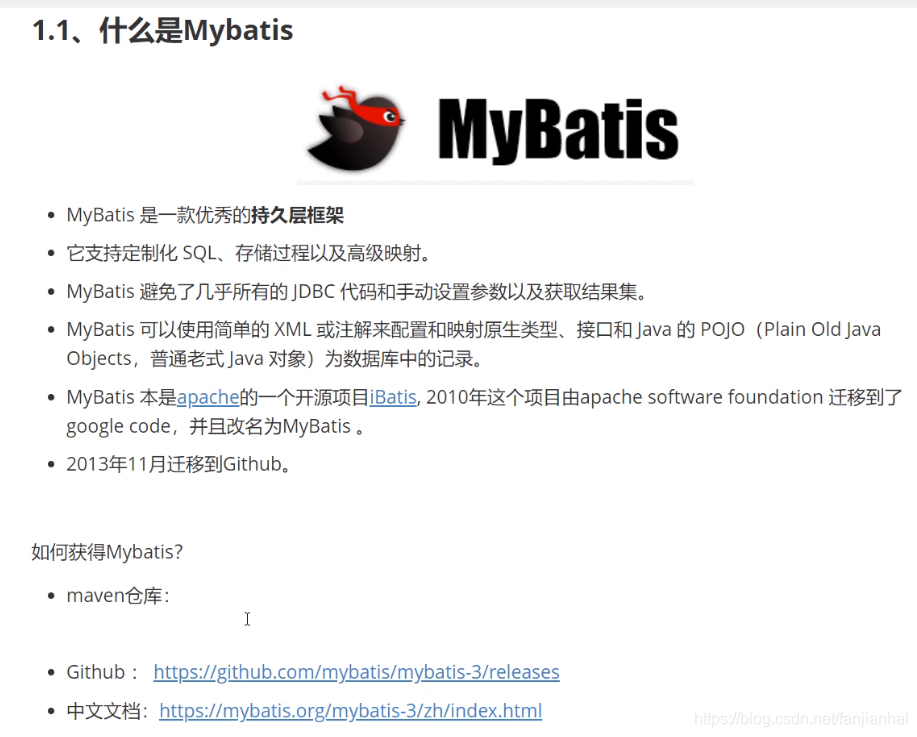
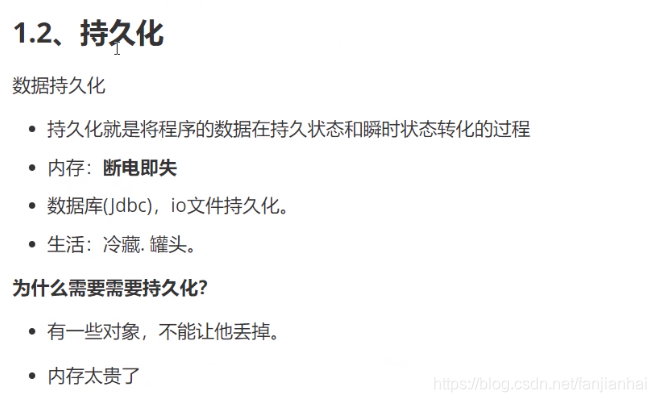
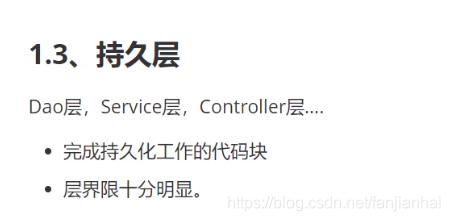
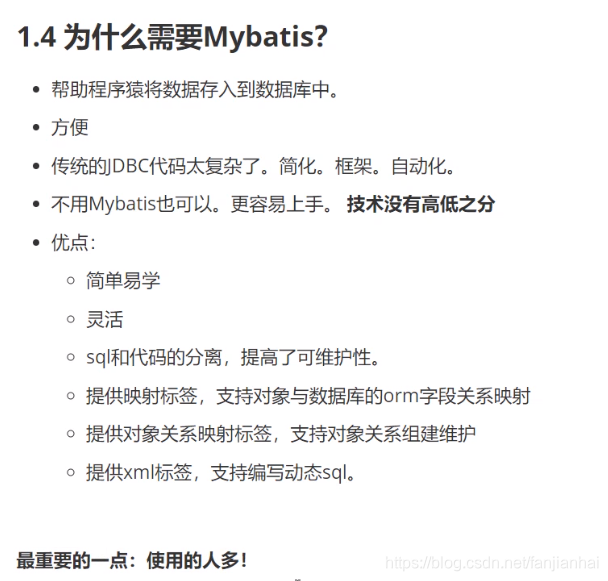
2. 第一个Mybatis程序mybatis-01
- 搭建环境
1 2 3 4 5 6 7 8 9 10 11 12 13 14 15 |
CREATE DATABASE `mybatis`; USE `mybatis`; CREATE TABLE `user` ( `id` INT(20) NOT NULL PRIMARY KEY, `name` VARCHAR(30) DEFAULT NULL, `pwd` VARCHAR(30) DEFAULT NULL ) ENGINE=INNODB DEFAULT CHARSET=utf8; INSERT INTO `user` (`id`,`name`,`pwd`) VALUES (1, '狂神', '123456'), (2, '李四', '123456'), (3, '张三', '123890') |
新建项目(创建子模块)
- 配置mybatis的核心配置文件
- 编写mybatis工具类
编写实体类
- 实体类
- Dao接口
- 接口实现类
测试
- junit测试
1 2 3 4 5 6 7 8 9 10 11 12 13 14 15 16 17 18 19 20 21 22 23 24 25 26 27 28 29 30 31 32 33 34 35 |
# 错误1 org.apache.ibatis.binding.BindingException: Type interface com.xiaofan.dao.UserDao is not known to the MapperRegistry. # 解决方案 <mappers> <mapper resource="com/xiaofan/dao/UserMapper.xml"/> </mappers> # 错误2 Cause: org.apache.ibatis.builder.BuilderException: Error parsing SQL Mapper Configuration. Cause: java.io.IOException: Could not find resource com/xiaofan/dao/UserMapper.xml # 解决方案 <build> <resources> <resource> <directory>src/main/resources</directory> <includes> <include>**/*.properties</include> <include>**/*.xml</include> <include>**/*.tld</include> </includes> <filtering>true</filtering> </resource> <resource> <directory>src/main/java</directory> <includes> <include>**/*.properties</include> <include>**/*.xml</include> <include>**/*.tld</include> </includes> <filtering>true</filtering> </resource> </resources> </build> |
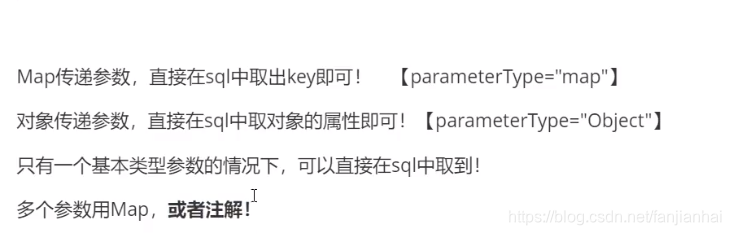
- 传递Map的情况
1 |
int addUser1(Map<String, Object> map); |
1 2 3 4 |
<!-- map只要和键值保持一致即可 --> <insert id="addUser1" parameterType="map"> insert into mybatis.user (id, name, pwd) values(#{userId}, #{userName}, #{password}) </insert> |
1 2 3 4 5 6 7 8 9 10 11 12 13 14 15 |
@Test public void testAddUser1() { SqlSession sqlSession = MybatisUtils.getSqlSession(); UserMapper mapper = sqlSession.getMapper(UserMapper.class); Map<String, Object> map = new HashMap<String, Object>(); map.put("userId", 5); map.put("userName", "胡一刀"); map.put("password", "123456"); mapper.addUser1(map); // 增删改必须提交事务 sqlSession.commit(); sqlSession.close(); } |
模糊查询
- Java代码执行的时候,传递通配符%%
- 在拼接sql中拼接通配符!
1List<User> getUserLike(String value);1 2 3<select id="getUserLike" resultType="com.xiaofan.pojo.User"> select * from mybatis.user where name like #{value} </select>1 2 3 4 5 6 7 8 9 10 11 12 13 14 15 16 17 18 19 20 21 22 23@Test public void testGetUserLike() { SqlSession sqlSession = null; try { sqlSession = MybatisUtils.getSqlSession(); UserMapper mapper = sqlSession.getMapper(UserMapper.class); List<User> userList = mapper.getUserLike("%胡%"); for (User user : userList) { System.out.println(user); } } catch (Exception e) { e.printStackTrace(); } finally { if (sqlSession != null) { sqlSession.close(); } } }
3. mybatis配置解析mybatis-02
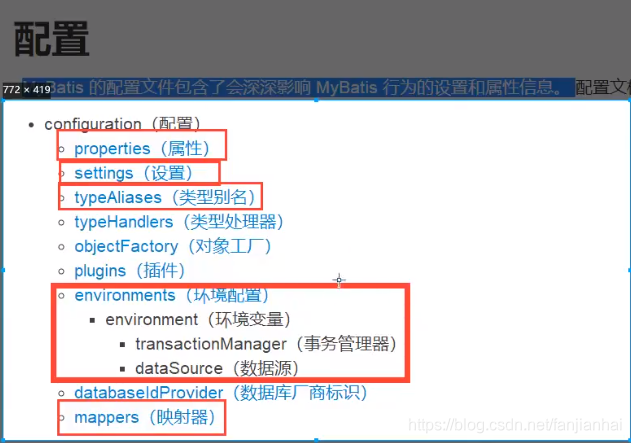
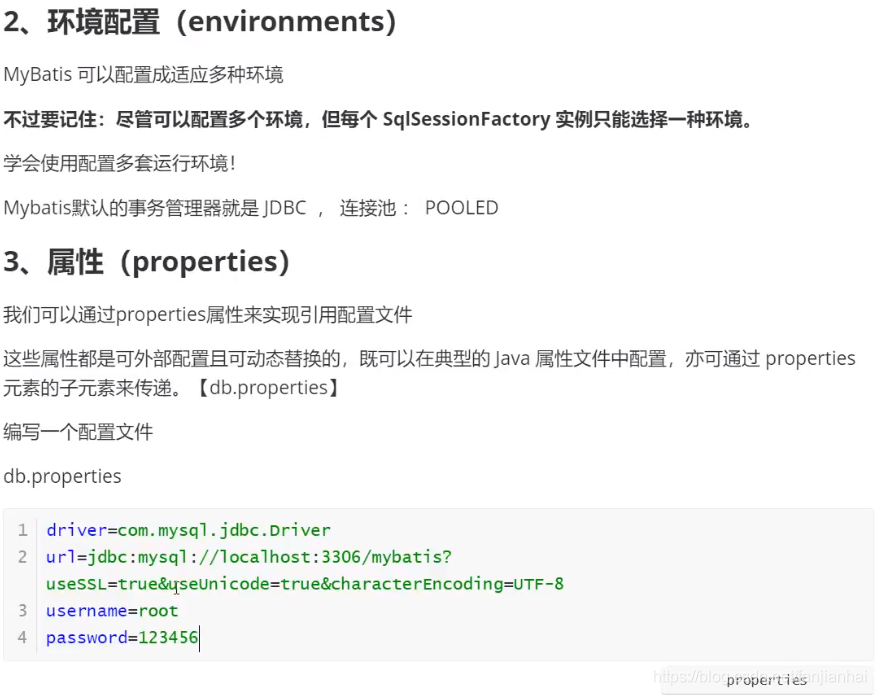
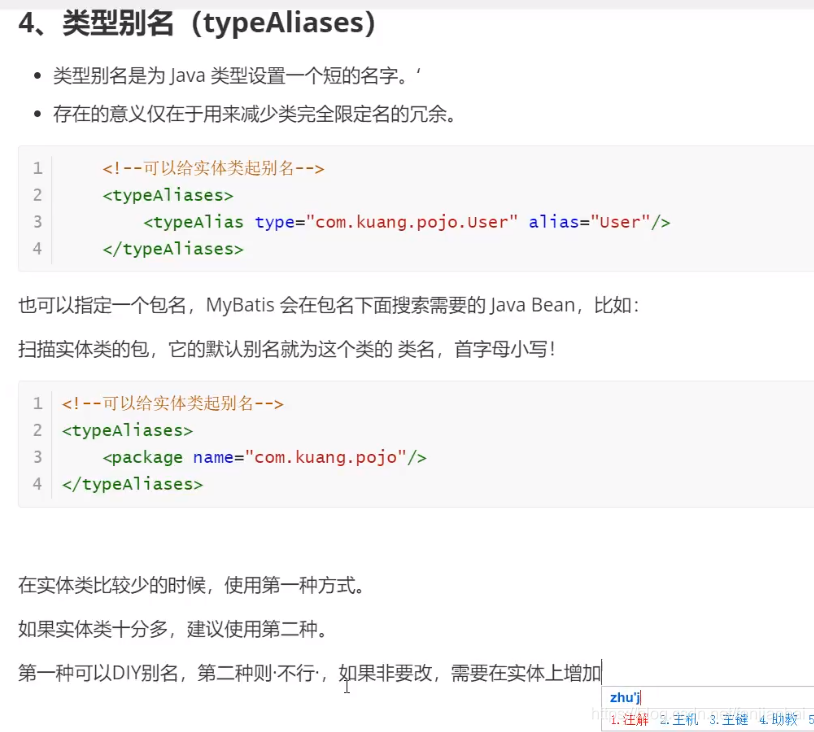
1 2 3 4 |
import org.apache.ibatis.type.Alias; @Alias(value = "hello") public class User { |
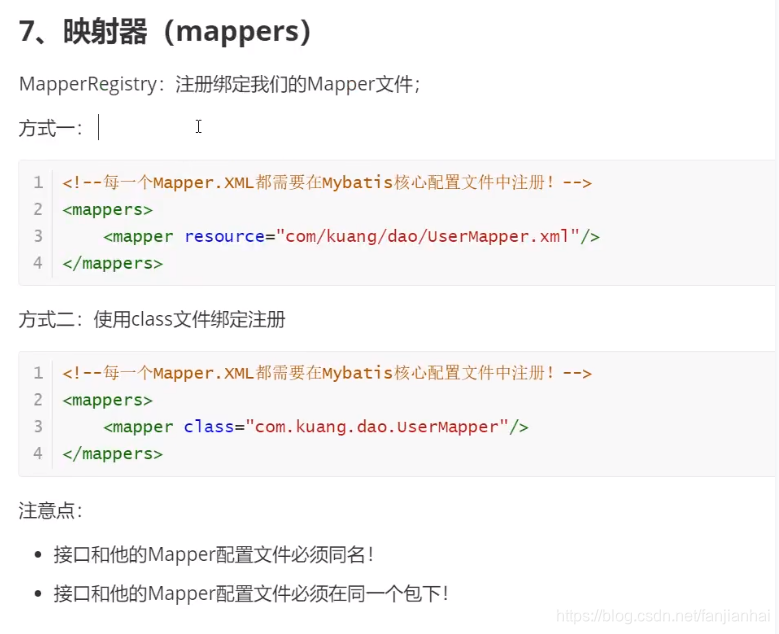
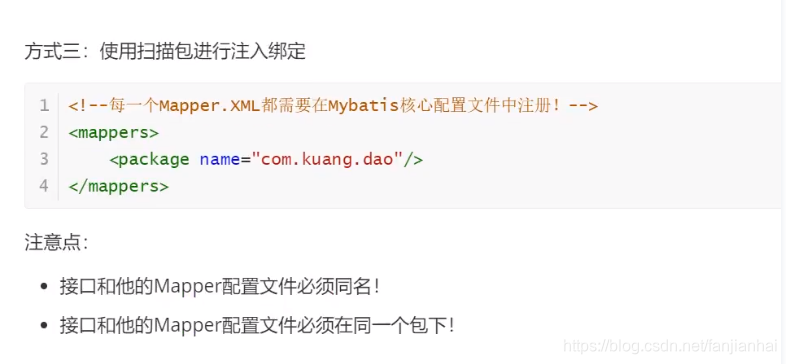
4. 结果集映射(解决属性名和字段名不一致的情况)mybatis-03
1 2 3 4 5 6 7 8 9 10 11 12 13 14 15 16 17 18 19 20 |
<?xml version="1.0" encoding="UTF-8" ?> <!DOCTYPE mapper PUBLIC "-//mybatis.org//DTD Mapper 3.0//EN" "http://mybatis.org/dtd/mybatis-3-mapper.dtd"> <mapper namespace="com.xiaofan.dao.UserMapper"> <resultMap id="UserMap" type="User"> <!--column: 数据库中的字段 property: 实体字段--> <!--数据库字段和实体字段一样的就不用做处理--> <!--<result column="id" property="id" /> <result column="name" property="name" />--> <result column="pwd" property="password" /> </resultMap> <select id="getUserById" resultMap="UserMap"> select * from mybatis.user where id = #{id} </select> </mapper> |
5. 日志mybatis-04
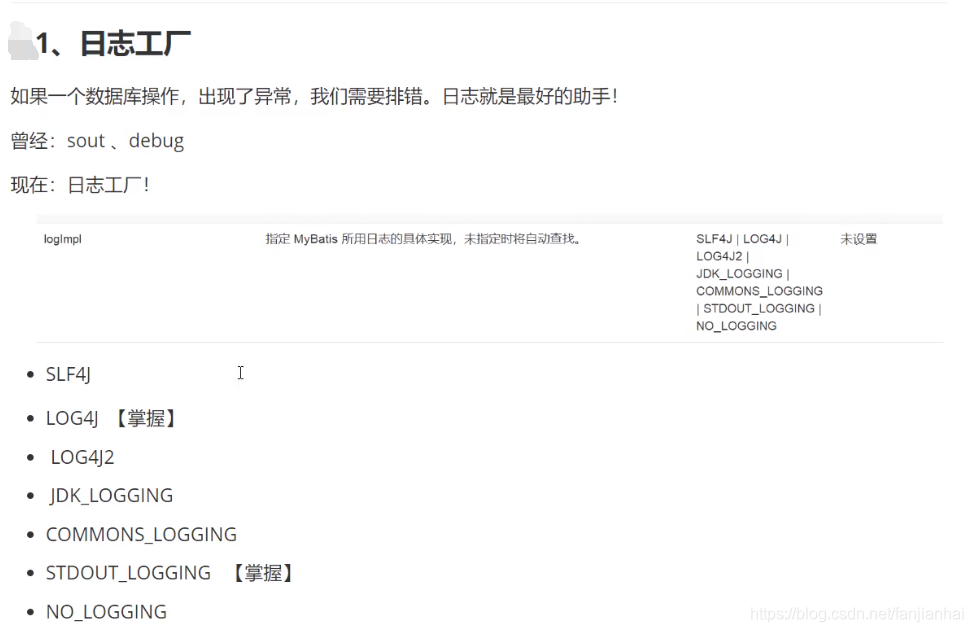
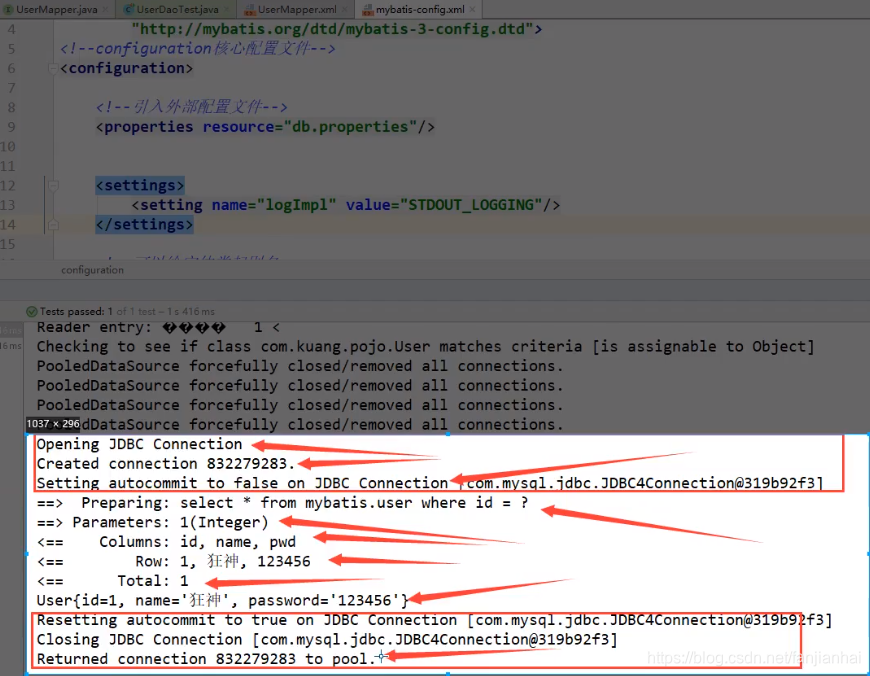
- STDOUT_LOGGING标准日志
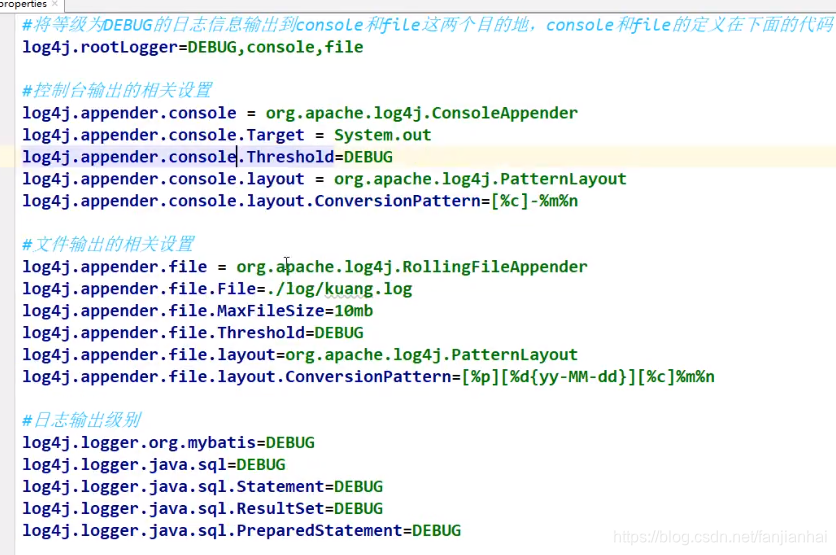
- LOG4J
1 2 3 4 5 6 7 8 9 10 11 12 13 14 15 16 17 18 19 20 21 22 23 24 25 26 27 28 29 30 31 32 33 34 35 36 37 38 39 |
# 将等级为DEBUG的日志信息输出到console和file这两个目的地,console和file的定义在下面的代码 log4j.rootLogger=DEBUG,console,file # 配置CONSOLE输出到控制台 log4j.appender.console=org.apache.log4j.ConsoleAppender log4j.appender.console.layout=org.apache.log4j.PatternLayout # 配置CONSOLE日志的输出格式 [frame] 2019-08-22 22:52:12,000 %r耗费毫秒数 %p日志的优先级 %t线程名 %C所属类名通常为全类名 %L代码中的行号 %x线程相关联的NDC %m日志 %n换行 log4j.appender.console.layout.ConversionPattern=[frame] %d{yyyy-MM-dd HH:mm:ss,SSS} - %-4r %-5p [%t] %C:%L %x - %m%n # 输出到日志文件中 log4j.appender.file=org.apache.log4j.RollingFileAppender # 保存编码格式 log4j.appender.file.Encoding=UTF-8 # 输出文件位置此为项目根目录下的logs文件夹中 log4j.appender.file.File=logs/root.log # 后缀可以是KB,MB,GB达到该大小后创建新的日志文件 log4j.appender.file.MaxFileSize=10MB # 设置滚定文件的最大值3 指可以产生root.log.1、root.log.2、root.log.3和root.log四个日志文件 log4j.appender.file.MaxBackupIndex=3 # 配置logfile为自定义布局模式 log4j.appender.file.layout=org.apache.log4j.PatternLayout log4j.appender.file.layout.ConversionPattern=%d{yyyy-MM-dd HH:mm:ss} %F %p %m%n # 输出日志级别(设置mybatis的日志级别) log4j.logger.org.mybatis=DEBUG # 对不同的类输出不同的日志文件 # com.xiaofan.dao包下的日志单独输出到xiaofan.log log4j.logger.com.xiaofan.dao=DEBUG,xiaofan # 设置为false该日志信息就不会加入到rootLogger中了 log4j.additivity.com.xiaofan.dao=false # 下面就和上面配置一样了 log4j.appender.xiaofan=org.apache.log4j.RollingFileAppender log4j.appender.xiaofan.Encoding=UTF-8 log4j.appender.xiaofan.File=logs/xiaofan.log log4j.appender.xiaofan.MaxFileSize=10MB log4j.appender.xiaofan.MaxBackupIndex=3 log4j.appender.xiaofan.layout=org.apache.log4j.PatternLayout log4j.appender.xiaofan.layout.ConversionPattern=%d{yyyy-MM-dd HH:mm:ss} %F %p %m%n |
测试通过!
参考链接:https://www.cnblogs.com/zhangguangxiang/p/12007924.html
https://www.cnblogs.com/yidaxia/p/5820036.html
6. 分页 mybatis-04
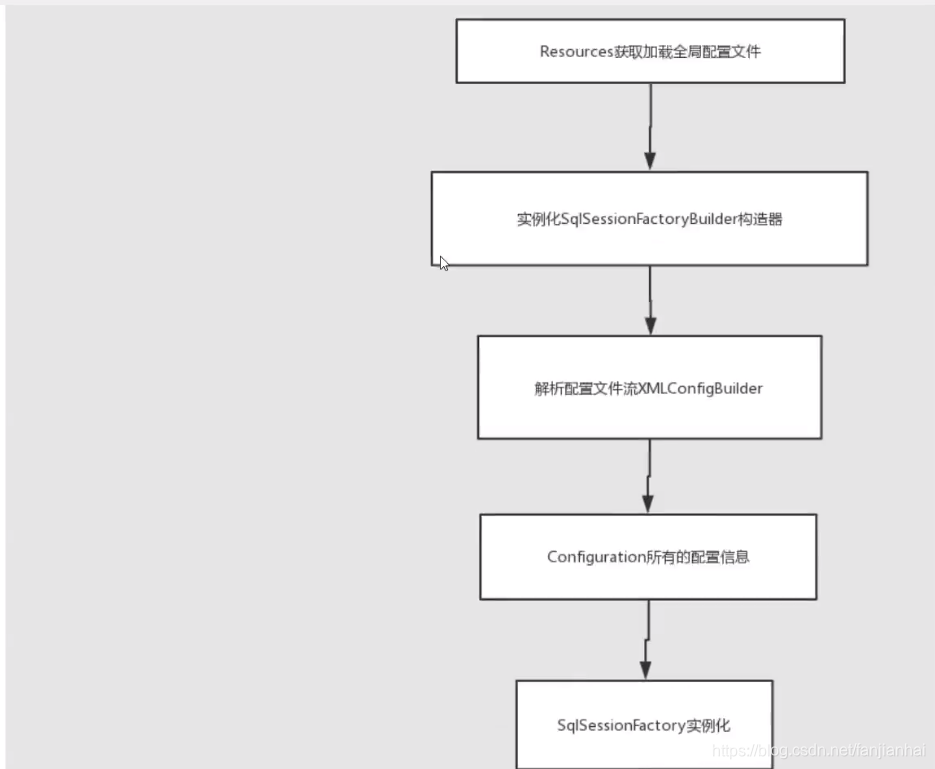
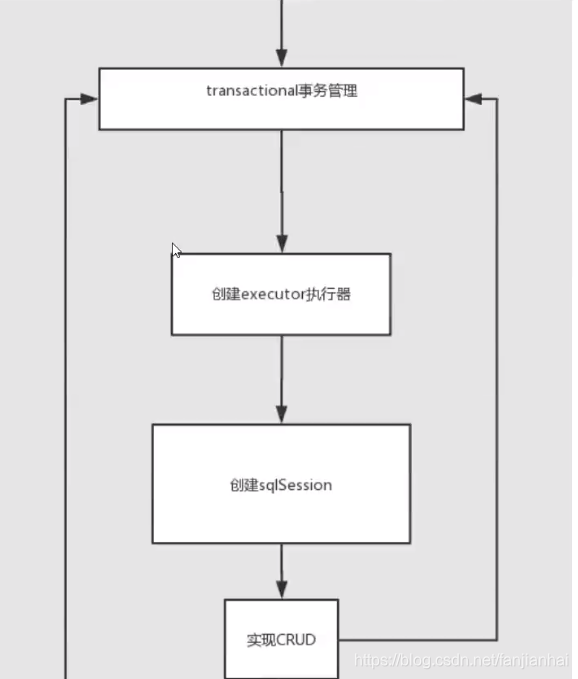
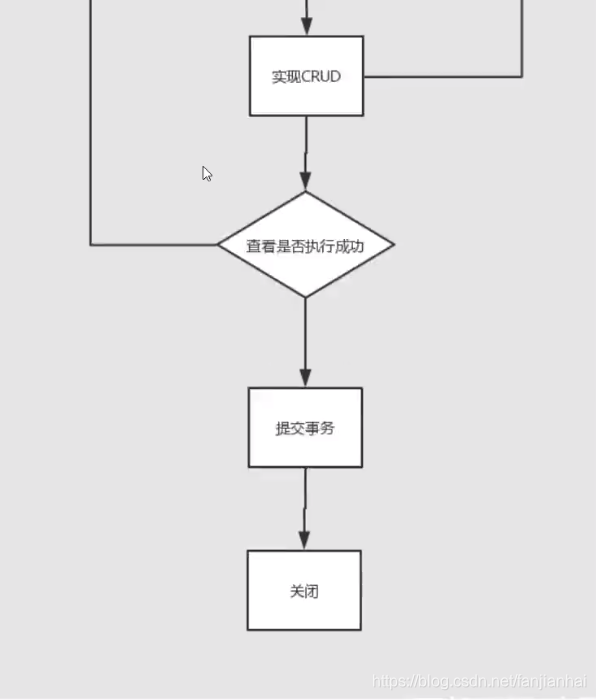
7. Mybatis执行流程
8. Lombok的使用(真正开发项目中不用)
- idea 安装Lombok插件
- 导包
- 用法
1 2 3 4 5 6 7 8 9 10 11 12 13 14 |
package com.xiaofan.pojo; import lombok.AllArgsConstructor; import lombok.Data; import lombok.NoArgsConstructor; @Data @AllArgsConstructor @NoArgsConstructor public class Student { private String id; private String name; private int age; } |
9 复杂查询环境搭建
注解和xml配合使用,对于简单的可以使用注解,复杂的使用xml
1 2 3 4 5 6 7 8 9 10 11 12 13 14 15 16 17 18 19 20 21 |
CREATE TABLE `teacher` ( `id` INT(10) NOT NULL PRIMARY KEY, `name` VARCHAR(30) DEFAULT NULL ) ENGINE=INNODB DEFAULT CHARSET=utf8; INSERT INTO teacher (`id`, `name`) VALUES (1, '秦老师'); CREATE TABLE `student` ( `id` INT(10) NOT NULL, `name` VARCHAR(30) DEFAULT NULL, `tid` INT(10) DEFAULT NULL, PRIMARY KEY(`id`), KEY `fktid` (`tid`), CONSTRAINT `fktid` FOREIGN KEY (`tid`) REFERENCES `teacher`(`id`) ) ENGINE=INNODB DEFAULT CHARSET=utf8; INSERT INTO `student` (`id`, `name`, `tid`) VALUES(1, '小明', 1); INSERT INTO `s`student`tudent` (`id`, `name`, `tid`) VALUES(2, '小红', 1); INSERT INTO `student` (`id`, `name`, `tid`) VALUES(3, '小张', 1); INSERT INTO `student` (`id`, `name`, `tid`) VALUES(4, '小李', 1); INSERT INTO `student` (`id`, `name`, `tid`) VALUES(5, '小王', 1); |
9.1. 多对一mybatis-05
- 按照嵌套查询进行处理(子查询)
1 2 3 4 5 6 7 8 9 10 11 12 13 14 |
<select id="getStudent1" resultMap="StudentTeacher1"> select * from mybatis.student; </select> <resultMap id="StudentTeacher1" type="Student"> <result property="id" column="id"/> <result property="name" column="name"/> <!--复杂的属性需要单独处理 对象:association 集合:collection--> <association property="teacher" column="tid" javaType="Teacher" select="getTeacherById"/> </resultMap> <select id="getTeacherById" resultType="Teacher"> select * from mybatis.teacher where id = #{id} </select> |
- 按照结果嵌套处理(多表关联)
1 2 3 4 5 6 7 8 9 10 11 12 13 14 |
<select id="getStudent2" resultMap="StudentTeacher2"> select s.id sid, s.name sname, t.name tname from student s, teacher t where s.tid = t.id </select> <!-- 注意别名问题 --> <resultMap id="StudentTeacher2" type="Student"> <result property="id" column="sid"/> <!-- 学生的名字 --> <result property="name" column="sname"/> <association property="teacher" javaType="Teacher"> <!-- 老师的名字--> <result property="name" column="tname"/> </association> </resultMap> |
9.2. 一对多mybatis-06
- 按照嵌套查询进行处理(子查询)
1 2 3 4 5 6 7 8 9 10 11 12 13 14 |
package com.xiaofan.dao; import com.xiaofan.pojo.Teacher; import org.apache.ibatis.annotations.Param; import org.apache.ibatis.annotations.Select; public interface TeacherMapper { @Select("select * from mybatis.teacher where id = #{id}") Teacher getTeacherById(@Param("id") int id); Teacher getTeacher1(@Param("tid") int id); } |
1 2 3 4 5 6 7 8 9 10 11 |
<select id="getTeacher1" resultMap="TeacherStudent1"> select * from mybatis.teacher where id = #{tid} </select> <resultMap id="TeacherStudent1" type="Teacher"> <collection property="students" ofType="Student" javaType="ArrayList" select="getStudentByTeacherId" column="id"/> </resultMap> <select id="getStudentByTeacherId" resultType="Student"> select * from mybatis.student where tid = #{tid} </select> |
- 按照结果嵌套处理(多表关联)
1 2 3 4 5 6 7 8 9 10 11 12 13 14 15 16 |
<select id="getTeacher2" resultMap="TeacherStudent"> select s.id sid, s.name sname, t.id tid, t.name tname from student s, teacher t where s.tid = t.id and t.id = #{tid}; </select> <resultMap id="TeacherStudent" type="Teacher"> <result property="id" column="tid"/> <result property="name" column="tname"/> <collection property="students" ofType="Student"> <result property="id" column="sid"/> <result property="name" column="sname" /> <result property="tid" column="tid"/> </collection> </resultMap> |
10. 动态Sqlmybatis-07
动态SQL就是指根据不同的条件生成不同的SQL语句
1 2 3 4 5 6 7 |
create table blog ( id varchar(50) not null comment '博客id', title varchar(100) not null comment '博客标题', author varchar(30) not null comment '博客作者', create_time datetime not null comment '创建时间', views int(30) not null comment '浏览量' ) ENGINE=InnoDB DEFAULT charset=utf8; |
- if
- choose (when, otherwise)
- trim (where, set)
- foreach
1 2 3 4 5 6 7 8 9 10 11 12 13 14 15 16 17 18 19 20 |
package com.xiaofan.dao; import com.xiaofan.pojo.Blog; import java.util.List; import java.util.Map; public interface BlogMapper { int addBlog(Blog blog); List<Blog> queryBlogIF(Map map); List<Blog> queryBlogChoose(Map map); int updateBlog(Map map); List<Blog> queryBlogForeach(Map map); } |
1 2 3 4 5 6 7 8 9 10 11 12 13 14 15 16 17 18 19 20 21 22 23 24 25 26 27 28 29 30 31 32 33 34 35 36 37 38 39 40 41 42 43 44 45 46 47 48 49 50 51 52 53 54 55 56 57 58 59 60 61 62 63 64 65 |
<?xml version="1.0" encoding="UTF-8" ?> <!DOCTYPE mapper PUBLIC "-//mybatis.org//DTD Mapper 3.0//EN" "http://mybatis.org/dtd/mybatis-3-mapper.dtd"> <mapper namespace="com.xiaofan.dao.BlogMapper"> <insert id="addBlog" parameterType="blog"> insert into mybatis.blog (id, title, author, create_time, views) values (#{id}, #{title}, #{author}, #{createTime}, #{views}); </insert> <select id="queryBlogIF" parameterType="map" resultType="blog"> select * from mybatis.blog <where> <if test="title != null"> title = #{title} </if> <if test="author != null"> and author = #{author} </if> </where> </select> <select id="queryBlogChoose" parameterType="map" resultType="blog"> select * from mybatis.blog <where> <choose> <when test="title != null"> title = #{title} </when> <when test="author != null"> and author = #{author} </when> <otherwise> and views = #{views} </otherwise> </choose> </where> </select> <update id="updateBlog" parameterType="map"> update mybatis.blog <set> <if test="title != null"> title = #{title}, </if> <if test="author != null"> author = #{author} </if> </set> where id = #{id} </update> <!-- select * from mybatis.blog where 1=1 and (id=1 or id=2 or id=3) --> <select id="queryBlogForeach" parameterType="map" resultType="blog"> select * from mybatis.blog <where> <foreach collection="ids" item="id" open="and (" close=")" separator="or"> id = #{id} </foreach> </where> </select> </mapper> |
1 2 3 4 5 6 7 8 9 10 11 12 13 14 15 16 17 18 19 20 21 22 23 24 25 26 27 28 29 30 31 32 33 34 35 36 37 38 39 40 41 42 43 44 45 46 47 48 49 50 51 52 53 54 55 56 57 58 59 60 61 62 63 64 65 66 67 68 69 70 71 72 73 74 75 76 77 78 79 80 81 82 83 84 85 86 87 88 89 90 91 92 93 94 |
package com.xiaofan.dao; import com.xiaofan.pojo.Blog; import com.xiaofan.utils.IDUtils; import com.xiaofan.utils.MybatisUtils; import org.apache.ibatis.session.SqlSession; import org.apache.ibatis.session.SqlSessionFactory; import org.junit.Test; import java.util.*; public class MyTest { @Test public void testAddBlog() { SqlSession sqlSession = MybatisUtils.getSqlSession(); BlogMapper mapper = sqlSession.getMapper(BlogMapper.class); Blog blog = new Blog(IDUtils.getId(), "Mybatis如此简单", "狂神说", new Date(), 9999); mapper.addBlog(blog); blog.setId(IDUtils.getId()); blog.setTitle("Java如此简单"); mapper.addBlog(blog); blog.setId(IDUtils.getId()); blog.setTitle("Spring如此简单"); mapper.addBlog(blog); blog.setId(IDUtils.getId()); blog.setTitle("微服务如此简单"); mapper.addBlog(blog); sqlSession.close(); } @Test public void queryBlogIF() { SqlSession sqlSession = MybatisUtils.getSqlSession(); BlogMapper mapper = sqlSession.getMapper(BlogMapper.class); Map<String, Object> map = new HashMap(); map.put("title", "Mybatis如此简单"); map.put("author", "狂神说"); mapper.queryBlogIF(map); sqlSession.close(); } @Test public void queryBlogChoose() { SqlSession sqlSession = MybatisUtils.getSqlSession(); BlogMapper mapper = sqlSession.getMapper(BlogMapper.class); Map<String, Object> map = new HashMap(); map.put("title", "Mybatis如此简单"); map.put("author", "狂神说"); map.put("views", 1000); mapper.queryBlogChoose(map); sqlSession.close(); } @Test public void updateBlog() { SqlSession sqlSession = MybatisUtils.getSqlSession(); BlogMapper mapper = sqlSession.getMapper(BlogMapper.class); Map<String, Object> map = new HashMap(); map.put("title", "Mybatis如此简单2"); // map.put("author", "狂神说"); map.put("id", "0d15b0c288514e39a8f757030a5708a9"); mapper.updateBlog(map); sqlSession.close(); } @Test public void queryBlogForeach() { SqlSession sqlSession = MybatisUtils.getSqlSession(); BlogMapper mapper = sqlSession.getMapper(BlogMapper.class); Map<String, Object> map = new HashMap(); List<Integer> ids = new ArrayList<Integer>(); ids.add(1); ids.add(2); ids.add(3); map.put("ids", ids); List<Blog> blogs = mapper.queryBlogForeach(map); for (Blog blog : blogs) { System.out.println(blog); } sqlSession.close(); } } |
11. SQL片段
有的时候,我们可能会将一些功能的部分抽取出来,方便复用!
- 使用sql标签抽取公共部分
1 2 3 4 5 6 7 8 |
<sql id="if-title_author"> <if test="title != null"> title = #{title} </if> <if test="author != null"> and author = #{author} </if> </sql> |
- 在需要使用的地方使用include标签应用即可
1 2 3 4 5 6 |
<select id="queryBlogIF" parameterType="map" resultType="com.xiaofan.pojo.Blog"> select * from mybatis.blog <where> <include refid="if-title_author"/> </where> </select> |
注意事项:
- 最好基于单标来定义sql片段
- 不要存在where标签
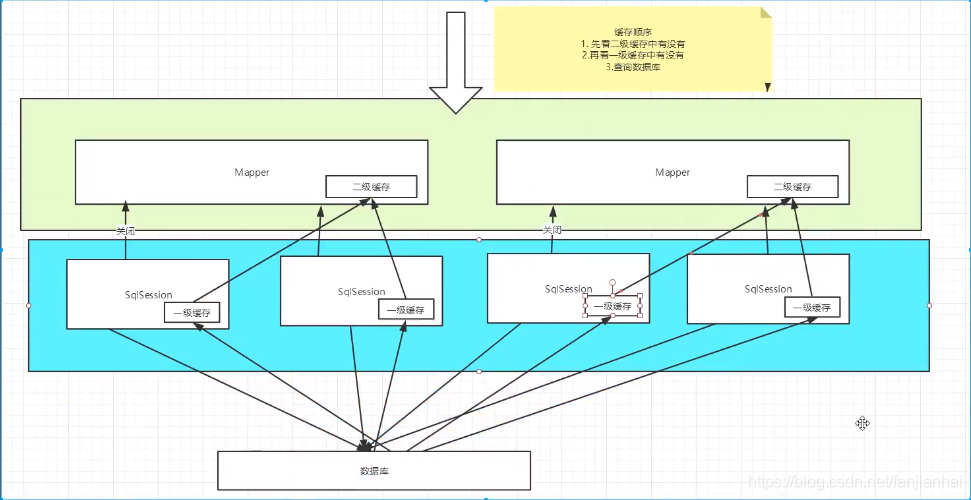
12. 缓存mybatis-08
一级缓存(默认开启)
开启日志
测试在一个Session中查询两次相同的记录
查看日志输出
缓存失效的情况
- 查询不同的东西
- 增删改查操作,可能会改变原来的数据,所以必定会刷新缓存!
- 查询不同的Mapper.xml
- 手动清除缓存
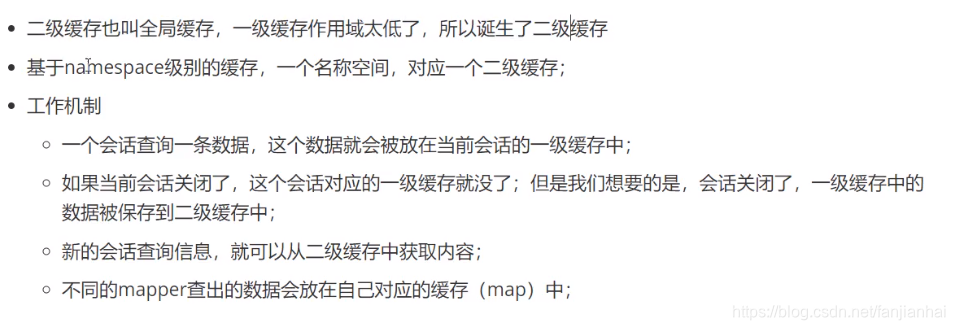
二级缓存
- 开启全局缓存
1<setting name="cacheEnabled" value="true"/>- 在当前Mapper中使用缓存
1 2<!-- 开启二级缓存 --> <cache />注意事项:实体需要序列化哦!

本博客所有文章除特别声明外,均采用 CC BY-NC-SA 4.0 许可协议。转载请注明来源 xhj的博客!